


Access by org line
Each leader sees only records about their own people. Anyone else on a record shows as "outside your line."

AI ROI agent for engineering leaders
Tetrate PRISM is an AI ROI agent. Leaders ask questions in plain English and get answers that join AI spend with engineering output, for their own teams.
Ask
Leaders ask. PRISM writes the query and runs it.
Check
Every number comes from a query on your own data.
Govern
Each leader sees only their own people.
Inside PRISM
A leader asks how AI spend compares with output on their team. PRISM answers with a table and a chart from the leader's own data.
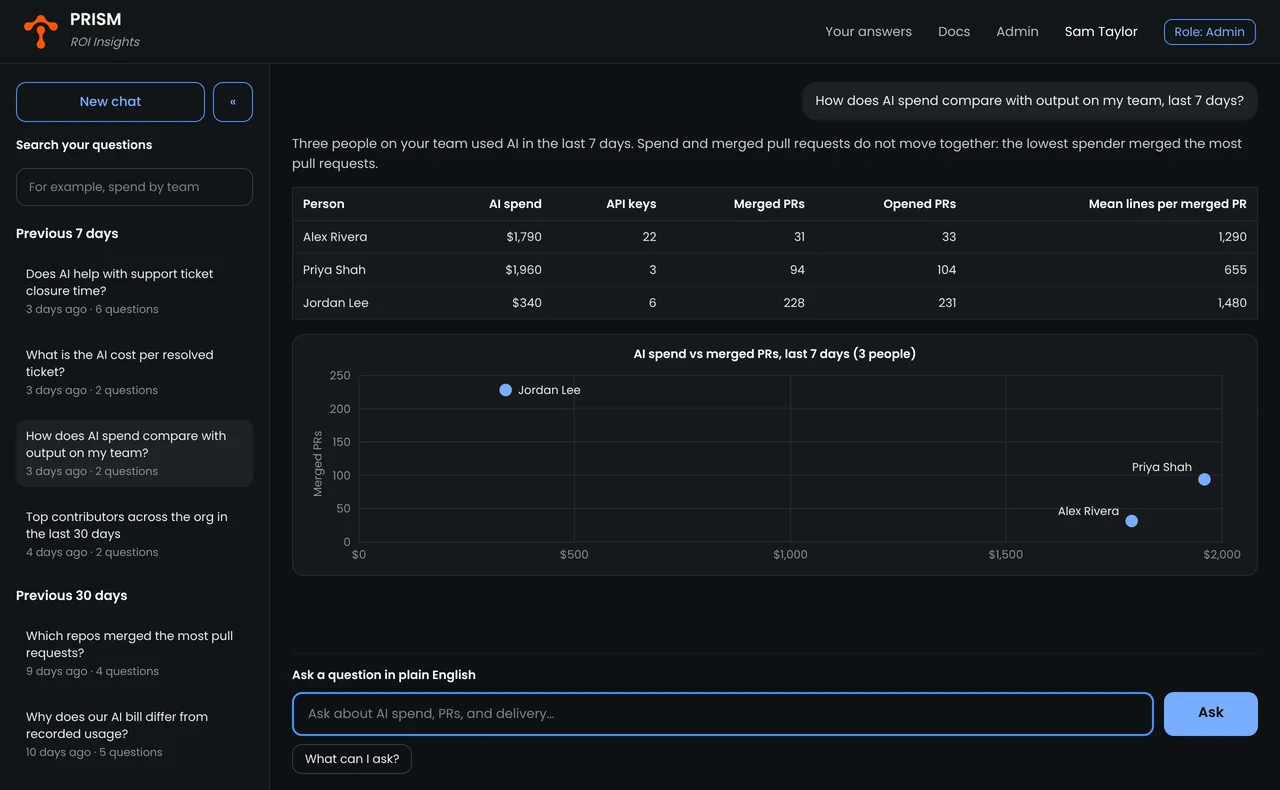

Type a question, or choose "What can I ask?" to see examples.

Answers show the numbers for each person, with a chart when one helps.

Past questions stay in the sidebar, so leaders can return to an answer.
The problem
AI spend and engineering output live in different systems, and no single system links them to the same person.
AI cost sits in the AI gateway. Commits, tickets and project hours sit in other tools.
Code accounts often use personal emails. HR, project and ticket systems each use their own IDs.
Each new question waits for a new report. One CIO waited five months for a list of developers with no Git account.
A leader should see their own teams, not the whole company.
How it works
Four steps. Access rules apply before any answer.
An admin adds each dataset, such as GitHub pull requests or a Snowflake view, then tests and approves it.
PRISM matches people across systems by HR ID and email, and places each person under their leader.
A leader asks a question. PRISM writes a query and runs it only on records about that leader's people.
Answers show names, counts and trends. Each number comes from your database, so teams can compare it with existing reports.

Mirror
PRISM copies history from systems such as GitHub and Jira, so it can answer questions over time.

Query-through
PRISM sends SQL to a data platform such as Snowflake and reads the result.

Files
PRISM reads spreadsheets, such as a team roster in CSV or Excel, as one more context stream.
Example questions
Real questions from engineering leaders, with the data each one uses.
| Question | Data used | What it shows |
|---|---|---|
| How many developers in my org have no pull requests this quarter? |
| Activity gaps |
| What did each team spend on AI last month, and how many pull requests did it merge? |
| Return on AI spend |
| Which pull requests were approved in under two minutes? |
| Code review risk |
| Which change caused this incident? |
| Incident cause |
| How many contractor architects report to each of my directors? |
| Workforce mix |
| Who are the top committers across GitHub and GitLab in my org? |
| Contribution |
Data integrations
Each dataset you connect is a context stream. One data source can have several.
Context stream: One dataset that an admin connects to PRISM for questions, such as GitHub pull requests or one Snowflake view. Each context stream is one entry on the PRISM admin page, and that page sets the count. One data source can have several context streams.
Enterprise-grade
The controls a bank or a public company asks for before a new tool reaches leaders.
Each leader sees only records about their own people. Anyone else on a record shows as "outside your line."

Users sign in with Microsoft Entra ID. Admin and leader roles set what each person can do.

Every question and answer is recorded. Admins see who uses PRISM and how often.

Admins add the company's own terms and metric definitions, so answers use the words leaders use.

PRISM runs in your own Kubernetes cluster. You install it with a Helm chart.

CVE fixes, bug fixes and version upgrades on a regular release schedule, with email and chat support on business days.
Customer story
The CIO of a large technology group needed to see how AI changes engineering work, across thousands of engineers.

For five months, I asked which of our developers had no Git account. PRISM answered that in seconds. Now PRISM will be a big part of our six-month tech transformation to build AI fluency across our teams.
FAQ
Tetrate PRISM is an AI ROI agent for engineering leaders. Leaders ask questions in plain English, and PRISM answers from the company's own data. It joins AI spend from Tetrate Agent Router Enterprise with engineering output from systems such as GitHub, Jira and ServiceNow, and shows the results by team and by person.
PRISM puts AI spend and engineering output side by side for the same people and teams. AI spend comes from Tetrate Agent Router Enterprise. Output comes from code, builds, tickets and project hours. Leaders can then compare spend with merged pull requests, closed tickets or project hours, team by team.
A context stream is one dataset that an admin connects to PRISM for questions, such as GitHub pull requests or one Snowflake view. Each context stream is one entry on the PRISM admin page, and that page sets the count. One data source can have several context streams.
PRISM connects to GitHub, GitLab, GitHub Actions, Jira, ServiceNow, Clarity PPM, Workday or any HR roster, Snowflake, PostgreSQL, spreadsheets, and Tetrate Agent Router Enterprise. An admin adds each dataset as a context stream, then tests and approves it.
No. With access by org line turned on, a leader sees only records about people in their own reporting line. Anyone else named on a record shows as "outside your line."
PRISM answers each question by running a query on your own data. The language model writes the query, and the numbers come from the database. Teams can compare any answer with their existing reports.
PRISM runs in your own Kubernetes cluster. You install it with a Helm chart, and users sign in with Microsoft Entra ID.
A global fintech implemented and onboarded PRISM in 8 weeks. In that time, its team connected 8 data sources and 12 context streams, set up access rules, and ran a two-week pilot with its leaders.



For engineering leaders

Bring three questions your leaders ask today. A Tetrate engineer will show how PRISM answers them on a demo deployment.